About Us

Online Catalog

Teachers

Articles

FAQ

Contact Us


STEP-BY-STEP INSTRUCTIONS

Based on manual for the Standard HOLOKIT (tm) set

(without images)

HOLOKITTM Hologram Kits

for students & teachers

Each kit provides the essential items for making many types of holograms in the classroom or at home. Starts at $99. Details.


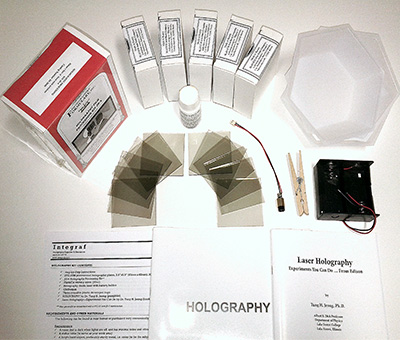
HOLOGRAPHY KIT CONTENTS
  • Step-by-Step Instructions
  • PFG-03M professional holographic plates, 2.5”x2.5” (63mm x 63mm), 30 plates**
  • JD-4 Holography Processing Kit**
  • PhotoFlo wetting agent (30ml)
  • Holography diode laser with battery holder
  • Clothespin
  • Three reusable plastic developer trays
  • HOLOGRAPHY by Dr. Tung H. Jeong (pamphlet)
  • Laser Holography—Experiments You Can Do by Dr. Tung H. Jeong (booklet)

** May generally be substituted with a PFG-01 and JD-2 combination.


NOTICE

Open your unexposed holographic plates only in the dark or under appropriate darkroom lighting.

Read the Terms and Conditions of Use in this packet, and all instructions and safety notices for the laser and chemicals before starting.


REQUIREMENTS AND OTHER MATERIALS

The following can be found in most homes or purchased very economically at your local drug or general store.

Requirements

  • A room that is dark when lights are off, and has minimal noise and vibration (creaky floors, etc.)
  • A stable table (to serve as your work area)
  • A bright hard object, preferably sturdy metal, i.e. coins (to be the subject of your hologram)
  • Two “D” size batteries (to power the laser)
  • One flat hardcover book 6”x8” (150x200mm) or larger (to serve as a shutter).
  • A small cup filled with sand (to hold the laser)—salt or sugar also works
  • A vase or any solid object about 1 foot (30cm) high (to serve as a tower upon which to place the laser).
  • Six 1-liter bottles (1.5 gallons) of distilled water (to prepare the processing chemicals)
  • Two large trays (or bowls) with flat bottoms 4”x5” or preferably larger (to serve as rinse water trays)
  • One rubber kitchen glove or tongs (to handle the holographic plate while developing)

Optional

  • A basic nightlight available at your supermarket or green safelight (to conveniently see in the dark room)
  • A computer mouse pad or a tray of sand (or salt or sugar) with width, length, and height of very roughly 6”x8”x2” (15x20x5cm) or larger (to serve as a vibration isolation system)
ADDITIONAL RESOURCES


Recommended Reading

Visit our dedicated online resources for your holography kit at http://www.integraf.com/hk.htm. There you can find additional tips and ideas about how to make holograms. We recommend reading our online article “Simple Holography”, the ideas of which inspired the creation of this holography kit and process.

Holography Helpline

At Integraf, our mission is to help you and your students make holograms. So, don’t be shy about contacting us via email or phone if you seek technical advice. Our technical support is led by Dr. Tung H. Jeong, a world-expert in holography and education with over 35 years experience.

We recommend you try making a couple of holograms first before contacting us. This way we can provide the accurate and focused feedback to your questions. Describe your set up, what you’ve tried, and what you are seeing. Also take a look at our “Trouble Shooting” section found at the back of this instruction packet.

Feedback

Thank you for purchasing the Integraf holography kit. We strive to provide the best products and services to our customers, and kindly invite you to email us  with your comments.


TERMS AND CONDITIONS OF USE

By purchasing, accepting, or using products from Integraf, you recognize that these products are intended for hologram making and education, and that reasonable care, caution, and adult supervision should be exercised in their intended use and such use only. You also agree to assume all risks of using, handling, storing, and disposal of any products, including but not limited to the Chemical Products and Laser Products described herein (“products”). If you for any reason do not want to or cannot assume all risks, please call (650) 351-5003 to return your product for a full refund.

Chemical Products. Some of our products contain chemicals, including but not limited to JD 2, JD-3, JD 4, and PhotoFlo (“dark room items”). Like many common household cleaners, each dark room item may contain small amounts of chemicals considered hazardous by the EPA, and should thus be treated with respect. You should read all safety labels and instructions prior to use. While the solutions made with dark room items have lower volatility than many household cleaners, working in a ventilated area is recommended. It is also good practice to wear aprons, dusk mast, safety goggles, and gloves when handling chemicals. Keep dark room items and their solutions away from children and food, and clearly mark them as not to be ingested. A responsible adult should supervise the use, handling, storage, and disposal of any dark room items and their solutions by minors. Copies of the material safety data sheets (MSDS) for all dark room items may be viewed and downloaded from our website at http://www.integraf.com, and are also available upon request.

Laser Products. The holography laser diode (“laser”) provided by Integraf is classified as Class IIIa, meaning it may be safe for momentary viewing but is a recognized eye hazard if viewed through optics (telescopes, magnifiers). Avoid looking directly into the laser light. Keep from the reach of from infants since the laser is small and may be a choking hazard.

Other Considerations. Always carefully handle glass plates, holographic or otherwise, as there is always the possibility that areas of these products may be sharp. As with all science experimentation, one should always practice reasonable and safe laboratory procedures and practices, especially since much of hologram making will happen in a darkened room.

Products are for laboratory use and use under adult supervision at home only, and are not for human ingestion, consumption, or other application. By accepting or using these products, you agree to assume all risk for use or keeping of such products, and you agree to exempt and release Integraf and any of its directors, officers, employees, agents, advisors, suppliers, and manufacturers from any and all liability, claims, expenses (including legal fees, medical expenses, or otherwise), demands or actions or causes of action whatsoever arising out of any damage, loss, injury, pain, suffering, or death as a result of their use. This release encompasses all losses, damages, expenses, injuries and pain, physical or mental, and deaths resulting from any cause, whether the fault of the user, a defect in the product, or misuse regardless of intention. This product liability limitation cannot be amended, altered or made void by any representative either verbally or in writing of Integraf, supplier, or the manufacturer, and the consumer agrees to the terms of these limitations when purchasing or receiving merchandise from Integraf. If you do not agree to these terms, please return the products for a full refund.


STEP-BY-STEP INSTRUCTIONS

The “white light reflection hologram” is one of the simplest hologram to make. We recommend you thoroughly read all instructions and tips here first before starting. You might even try a “practice run” without using any holographic plate first, as a way to familiarize yourself with the process.

1. Define your laboratory space. Choose a sturdy table in a dark room that is free of noise, vibration, air currents, and small movements (creaky floors, etc.). In the same room or in another dark room, find a place to set up as your chemical processing room (well ventilated, preferably near a sink, etc.).

2. Gather holography kit contents and the additional household materials listed above

3. Prepare the subject and your optional vibration isolation system. Place the subject securely on the sturdy table. If you have a computer mouse pad or tray of sand, place the subject on top of that. For your first hologram, we highly recommend using bright coins, e.g. quarters, dimes, nickels. By learning from your first successful hologram, you be able to venture onto using other subjects more easily.

4. Prepare and warm up the laser diode for at least 5 minutes

a. Unscrew the black collimating lens and spring off your laser, and store them away.

b. Clip the metal cylindrical area of your diode laser with the clothespin.

c. Stick the other end of the clothespin securely into the cup of sand.

d. Load the battery pack with two D-size batteries and then connect the wires together (red to red, black to black) to power the laser.

e. Position laser so that its beam spreads out horizontally in an elliptical shape (it looks similar to that of a loaf of bread).

5. Position the laser until the subject is optimally and fully illuminated.

a. Place the vase serving as your tower up-side-down about 1 foot (30cm) away from the subject. You can substitute the vase with any other sturdy object of similar height (stack bricks, a wooden box, lab stand, etc.). Avoid books, cardboard or anything else that may deform.

b. Place your cup with laser on top of the tower, and angle the laser down toward the object. Lean the clothespin along the edge of the cup so it is braced against movement.

c. Adjust laser angle until the subject area is fully illuminated. (You may need to dim the lights to see this).

6. Prepare the chemical solutions following the instructions found in your JD holography processing kit.

7. Turn off all lights except your green safelight if you are using one. If you’re using a standard night light, position it under table or behind something so the light does not directly shine anywhere near your work area. If you have neither, simply allow a tiny amount of soft light to sneak indirectly through the crack under the door to your room. Block any direct light from reaching the holography system. The room should be dark enough that one cannot read.

8. Completely block the laser light from reaching the subject with one book. The book will serve like a shutter in a camera.

9. Prepare one holographic plate

a. Remove one plate from its box in the darkest part of the room.

b. Make sure all remaining unexposed plates are safely placed back into the original box to protect them from unintended exposure.

c. Identify which side of the plate has the holographic emulsion. It feels slightly sticky side when touched with moistened fingers. (If you cannot identify it, don’t worry, the hologram will still work.)

10. Carefully place the plate on top of the subject (coins), ideally with the emulsion side facing down against the subject. Though not required, it is helpful to remember which side you leaned toward the object since you’ll need to know this later for viewing the hologram later.

11. Make the hologram exposure

a. Allow at least 10 seconds for the subject and holographic plate to settle. Hold still and maintain absolute silence.

b. Now, slowly lift the “shutter” slightly off the table a half inch (1cm) while still blocking the laser light from reaching any part of the plate, and wait a few seconds for any vibration to subside.

c. Then, lift the shutter all the way up to expose the holographic plate and object for about 10 seconds.

d. Then, block the laser light by placing the book back on the table.

12. Process the plate according to instructions that accompany your JD holography processing kit.

13. Dry the holographic plate vertically. A simple way to do this is by placing the plate on a paper towel and lean it against a wall. If time is limited, you can carefully blow warm air across the holographic plate using a hair dryer from at least foot (30cm) away. Avoid high heat.

After the hologram is thoroughly dried, your reflection hologram can be viewed with a point source of incandescent light such as that from a projector, flashlight, spotlight, LED white light, or the sun. Shine the spotlight from the same angle your laser beam shined on the plate during exposure. One cannot use diffused light sources such as frosted bulbs and florescent lamps. Note that though the plate may look dry, it sometimes still has moisture on it.


TIPS & TOPICS TO HELP YOU MAKE HOLOGRAMS

1.0 Avoid Vibration

Vibration and minute movements are the main reason holograms don’t turn out. If any part of your holography system moves even one millionth of meter during exposure, your hologram will not likely turn out. So avoid talking, music, noise, walking around, air currents, creaky floors, soft objects, temperature changes to the object. . . . What other things can you think of that might cause vibration?

Many items deform beyond what we can see with the naked eye. This is due to tension, gravity, changes in temperature, and air current, among other things. Avoid using items made of soft plastic, paper, and cardboard when choosing your subject and other parts of your system.

If one is using holographic film instead of plates, know that film is particularly vulnerable to discreet movements and vibration. The film can flutter under air current or shrink and expand due to the heat on your fingers. To address this, we sandwich the film between two glass plates fastened by clips, squeeze out any air pockets between the film and the glass plates, and let the film-plate sandwich settle for a full five minutes.

Given the above, it is understandable why we should find a work area with a sturdy table that is far from noise and vibration (air conditioners, heating vents, noisy traffic outside, etc.). Using a computer mouse pad or tray of sand (or salt or sugar) helps dampen vibration.

2.0 Choose Your Subject Wisely

For the subject of your first hologram, we recommend using coins, such as quarters or dimes, since these are bright, hard, and non-deforming. By successfully making one hologram first, you will learn the fundamentals needed to venture onto using other objects.

For your subsequent holograms, the appropriate choice of your subject is critical. In general, your subject should ideally (1) be made of a solid material such metal or porcelain; (2) appear bright when illuminated with the red laser light; and (3) not move or deform.

Try to avoid choosing objects that are fabric or furry objects (e.g. teddy bear), since these objects deform most easily. Try to also avoid large plastic objects as they tend to expand and contract with the slightest change in temperature (even from the heat of your fingers!).

3.0 Prepare the Diode Laser for Holography

To make holograms, unscrew the black collimating lens from the front of the laser. A small spring behind the lens will pop out. Keep both in a safe place so you can put them back on later (this protects the laser from dirt and dust for future use). Hold the laser by the brass cylinder and avoid touching the exposed circuit board. By removing lens, the beam can shine out much like a flashlight and illuminate an elongated elliptical area.

To power the laser, use two D-size batteries (3.0 volts) for best results and connect the wires (red to red, black to black). Do not let the black and red wires touch. If preferred, you can use other highly stabilized DC power sources with an output of 3.0 volts (or up to 4.5 volts).

Make sure to turn on the laser for at least five minutes before making holograms. Avoid touching the laser for the two minutes just prior to making an exposure, since any disturbance to the laser causes it to become unstable. Finally, avoid cross draft (moving air) across the laser. This affects the laser’s operational stability needed for making holograms.

The holography diode laser included in your kit is classified as Class IIIa, and has an output similar to that of common laser pointers and grocery store scanners. Nonetheless, one should avoid looking directly into the laser beam.

4.0 The Basics of Using Your JD Holography Processing Kits

Optimized by Dr. Tung H. Jeong and his colleagues, the JD holography processing kit provides a convenient and inexpensive alternative to buying and mixing your own chemicals. Just add water to create stock solutions to prepare the Developer and Bleach, as well as Wetting Solution.

For a full understanding of the JD kits and safety measures, we highly recommend you read the instructions and notices that accompany the JD kits. Instructions may also be found online at http://www.integraf.com. The two processes for using the JD kit are significantly abridged here:

(1) Preparing the stock solutions

a. Mix the chemicals with distilled water for Part A, Part B, and Bleach in separate 1-liter bottles.

b. Set up the trays in the following order: Developer, Rinse #1, Bleach, Rinse #2, and Wetting Solution.

c. Pour equal parts of Parts A and B into one tray to form the Developer, enough to submerge at least one holographic plate.

d. Pour the Bleach into a separate tray.

e. Pour distilled water into the Rinse trays.

f. Pour a capful of PhotoFlo into 1 liter of water to form the Wetting Solution.

(2) Processing the holograms.

a. With a rubber glove or tongs, slip the holographic plate into the Developer, preferably with the emulsion side facing upwards to prevent scratching. Hold the plate from the edges.

b. Agitate holographic plate in the Developer until it is dark (it takes 20 seconds to 2 minutes).

c. Rinse with agitation for at least 20 seconds (up to 3 minutes).

d. Agitate the hologram in the Bleach until clear (less than 2 minutes)

e. Rinse again for at least 20 to seconds (up to 3 minutes)

f. Finish the hologram in Wetting Solution for 20 to 60 seconds

g. Dry the hologram by standing the holographic plate vertically (i.e., lean it against a wall)

Though the JD chemicals are termed non-volatile, chemicals do evaporate over time and may cause nose and throat irritations. It’s always a good idea to use the chemicals in a ventilated area and follow recommended safety precautions.

5.0 Viewing Your Hologram

For a reflection holograms made with the instructions above, the image can be viewed after thorough drying. Thorough drying may take minutes to hours, depending on ambient conditions and technique. Transmission holograms, on the other hand, can be viewed with laser light even when wet. You can learn how to make these kinds of holograms online at http://www.integraf.com.

To view your reflection hologram, you need an appropriate viewing angle and light source. With the appropriate light source, view the image by shining the spot light at the hologram from approximately the same angle you had the laser shoot when you were first exposing plate. To see the hologram, you might need to tilt the plate left and right or forward and back to maximize the brightness of the image. It actually takes some practice.

As for the light source, ideally, you want a bright spot light such as that from a slide projector or sunlight. Spot lights concentrate the light using a built-in reflector so that all the light is confined to the correct angle. As an inexpensive substitute, you can use a white LED pin light found at your local retail store. You generally cannot view a reflection hologram using lasers, fluorescent light, or frosted light bulbs.

6.0 Storing Your Unexposed Holographic Plates, Developer, and Laser

To extend their shelf life, your unexposed holographic plates should be protected from moisture and heat. Wrap your box of holographic plates with kitchen plastic wrap or place them in a reasonably air-tight plastic bag. Refrigerate to extend longevity. Holographic plates should be allowed to reach room temperature before opening in order to prevent condensation.

Storage of the JD developer is explained in detail in the instructions that come with each kit or at http://www.integraf.com. Store away from food and children, and always label packages clearly as materials not to be consumed.

Your holography diode can be used for years if used and stored properly. When not in use, place the collimating lens back onto the laser, with or without the spring, so as to avoid dust and dirt from getting into the laser. Then, carefully wind up the wires to the laser without touching the circuit board and place the laser back into the original protective canister.


AFTER YOUR FIRST HOLOGRAM

Congratulations! You’ve made your first hologram and are now ready to make some new holograms. For awkward-shaped, larger, or multiple subjects you need only adjust your system slightly as described below. The rest of the processes (removing the lens from the laser, exposure time, developing procedure, etc.) remain the same. Just remember, the more complex your set up and subject, the more chance there is for movement (and thus a sub-optimal hologram). The rules for choosing your subject still hold (hard, bright, non-deforming).

Non-flat or Awkward-Shaped Subjects

Try using placing your subject in a bowl, tray, or shallow cup, and then placing the holographic plate on top of it. This is particularly useful when you want greater depth or are using larger holographic plates.

Getting a Profile or Deeper Image of Your Subject

Here, you are going to place the holographic plate in a vertical position right next the subject, and then place the laser on the table instead of the tower. For 2.5”x2.5” (63mm x 63mm) plates, you can lean the holographic plate directly against the subject.

You may need a brace in order to keep the plate vertical (about 90 degrees) if you feel the subject and plate cannot be stabilized. A brace is also helpful if you are using larger 4”x5” (102mm x 127mm) holographic plates.

Two sturdy cups can serve as your convenient brace. Alternatively, you could also use two wooden blocks, paper weights, salt and pepper shakers, or anything hard that does not deform or slip on your table (mouse pad or sand tray). Avoid cardboard and books. Books continuously move as air pockets between the pages escape.

Step-by-step for using a brace:

1. Place the two cups apart to form a brace, approximately the same width as your holographic plate.

2. Place the laser (and its cup and clothespin) on the table instead of the tower (vase), so the subject and laser are at the same level.

3. Position the laser until the object is optimally and fully illuminated. Place the laser about 1 foot (30-40cm) away from the subject. To help see the beam, place a white card (or piece of paper) behind the object and adjust the laser while looking at the shadow on the card.

4. Block the laser light with your book (shutter) and prepare your holographic plate.

5. Place the holographic plate between the laser and the object, leaning against your two cups (brace).

6. Expose and process as previously described.

Other Kinds of Holograms

With your holography kit, you can also make several other kinds of holograms.

  • A transmission holograms that can be viewed by laser light and even projected onto a screen
  • A multi-image hologram
  • A hologram that lets you see how much an object deforms over time or due to stress (one student made a hologram of a mushroom and showed that it grew in a span of a few minutes!)
  • A diffraction grating to observe the spectrum of sunlight showing what elements are there (front-surface mirror required)

Information on how to make these holograms can be found in your booklet Laser Holography—Experiments You Can Do. Also see http://www.integraf.com for frequently updated tutorials, tips, and articles.


TROUBLE SHOOTING

Below are some common issues that holographers experience when making a hologram, especially for the first time, along with some key questions and possible solutions.


“I don’t’ see any image at all.”

Chances are very high that your system encountered vibration or movement.

  • Was there some air current blowing onto your holography system?
  • Was the object as your subject hard and bright?
  • Was the laser really placed stably?
  • Was the room generally still and quiet around the exposure time?
  • Did anyone touch the table during exposure?
  • Did anyone sneeze or talk aloud?
  • Remember that the longer you expose the holographic plate to the laser light, the higher risk you run of encountering vibrations (and thus getting no image at all).

Laser lost frequency stability

  • Make sure the laser warmed up for at least five minutes

  • Avoid air drafts
  • Avoid touching the laser during two minute prior to exposure

The hologram has not completely dried yet

Though it may look dry, the hologram may still be moist. Try waiting a little a few minutes longer or even an hour, depending on ambient conditions.

Hologram is not viewed correctly

  • View under appropriate lighting. Florescent and frosted light bulbs do not work.
  • View the hologram from the front side and same angle that the laser exposed it.

“I see an image but it’s dim”

  • The object may not be bright enough. Pick something white or bright metal.
  • The object may have moved slightly. Make sure the object is hard and does not deform.
  • Check to see if your laser is fully and directly illuminating your object and plate area.
  • Try increasing exposure time by a few seconds (not too much longer)
  • Try bringing the laser closer to the object, while still allowing full illumination.
  • Check that that you are using distilled water. (Tap water may contain impurities or minerals.)
  •  

“My holographic image is there but seems foggy or has streaks and spots”

  • Make sure your developing the hologram with sufficient time in each step.
  • Try rinsing longer (up to 3 minutes) between the developer and bleach steps.
  • See that the wetting solution is evenly applied when removing the hologram
  • Watch out for drips and droplets when hanging drying the hologram.
  •  

“My hologram looked great two weeks ago, but now it’s kind of faded”

  • Try rinsing longer (up to 3 minutes) between the developer and bleach steps.
  • Avoid leaving the hologram under direct sun. Just like photos, holograms fade can fade.